How to Use Teapotheca
On this page
Teapotheca is built the way a good apothecary cabinet is organized: not by alphabet, but by what ails you. Tell it how you’re feeling, and it points you toward the herbs, recipes, and remedies that traditionally help — with the sourcing, safety notes, and traditions behind them close at hand. Here’s how to find your way around the shelves.
Finding What You Need: Discovery
Start on the Discovery page. Instead of hunting through an index of herb names you may not know yet, choose the way you’re feeling or what you’re dealing with — Seeking Calm, Tired, Head Discomfort, Grief Support — and Teapotheca surfaces every herb and recipe traditionally suited to it. Select more than one and the list narrows to match; if nothing lines up exactly, we widen the search rather than leave you with an empty shelf.
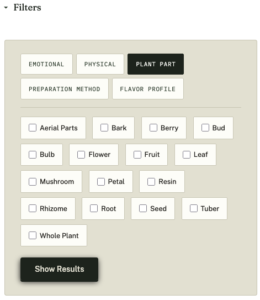
Full Herbarium members get three more drawers to search by: Plant Part, Preparation Method, and Flavor Profile. Want something you can steep as a tea rather than tincture, or a flower rather than a root? Layer those filters on top of how you’re feeling and the results narrow further.
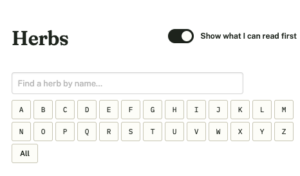
If you’d rather browse by what’s freely available first, flip the “Show what I can read first” switch at the top of any archive — it reorders the list so unlocked herbs, recipes, and articles come first.
Searching the Herbarium Directly
Already know the herb you’re after? The Herbs archive has a live search box that checks the full library as you type, plus an A–Z strip if you’d rather browse by name. Both search everything on file, not just what’s currently loaded on the page.
Reading a Herb Entry
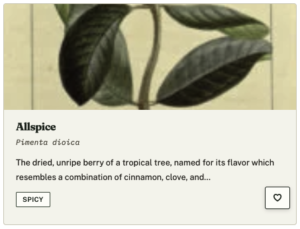
Every herb page opens like a page from a botanist’s field notebook: common name, botanical name set in its own specimen-label type, and the essentials at a glance. Below that:
- Traditional Uses — what the herb has historically been reached for, and why
- Preparation Notes — how it’s typically taken: tea, tincture, poultice, and so on
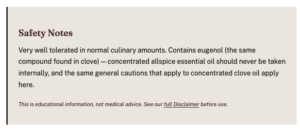
- Safety Notes — always visible, even to non-members, because knowing what to watch for shouldn’t sit behind a paywall
- Sources — the references behind the entry, so you can go deeper yourself
Three optional drawers open further down the page when there’s something to say.
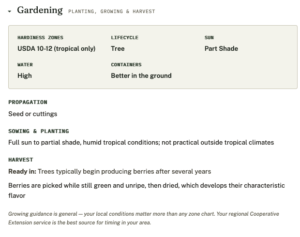
Gardening
Hardiness zones, propagation, sowing and harvest timing, and any growing cautions (a few herbs, like Comfrey, spread more than you’d expect).
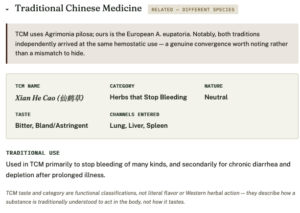
Traditional Chinese Medicine
Where a herb has a real counterpart in TCM, this section lays out its Chinese name, nature, taste, and the channels it’s traditionally said to enter — in TCM’s own vocabulary, not flattened into Western terms. Just as important: where our herb is only a relative of the true TCM herb (same genus, different species), that’s flagged plainly, so you’re never left assuming two plants are interchangeable when they aren’t.
This section only appears where a herb genuinely has a match — no filled-in placeholders, no forced entries.
Articles Mentioning This Herb
A quiet thread back to any Teapotheca articles that reference it.
Reading a Recipe
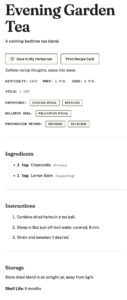
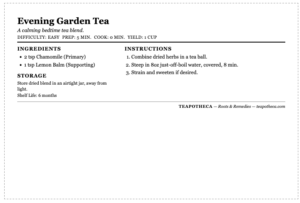
Recipes list every herb involved, the steps to prepare it, and — pulled in automatically from each ingredient herb — the sources behind it, deduplicated so you’re not reading the same citation five times. Any recipe meant for external use only, or with a real caution attached (a steam inhalation, say), has that instruction written directly into the method, not buried in a disclaimer at the bottom.
Want it on paper while your hands are busy? The Print Recipe button strips away the site’s menus, notes, and extras and gives you a clean, kitchen-counter-ready page.
Make It Yours: Saving, Notes, Collections & the Brewing Log
Teapotheca isn’t only a reference shelf — it’s meant to become your reference shelf, marked up and organized the way you’d dog-ear a well-loved book. Four tools, working together, make that possible for Full Herbarium members.
Saving to Your Herbarium
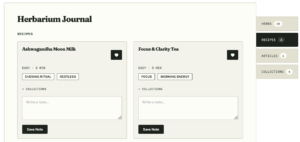
See a small heart  in the corner of a herb, recipe, or article card? Tap it, and that item is added to My Herbarium Journal — your personal shelf pulled out from the full library. It’s the simplest way to build a working set of go-tos: the herbs you reach for, the recipes worth repeating, the articles you’ll want again.
The Journal organizes everything you’ve saved into tabs by type — Herbs, Recipes, Articles, Collections — notebook-style, so your saved Chamomile entries don’t get lost among your saved recipes.
Private Notes
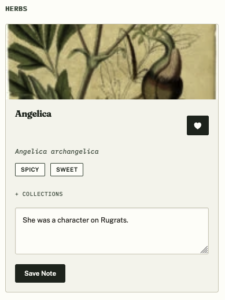
Every saved item carries its own note field, and it’s genuinely private — nothing you write here is ever visible to anyone but you, and it’s never posted as public content. Jot down a dosage that worked, a substitution you made, or just “reminds me of Grandma’s kitchen.”
You don’t even need to save an item to note it: adding a note alone is enough to pull that item into your Journal, so a plain outline heart next to a note quietly says “I tried this one, and here’s what I thought.”
Collections
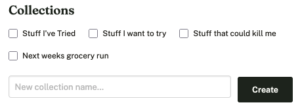
Once you’re saving more than a handful of items, Collections let you shelve them your own way — a “Sleep Support” grouping, a “Winter Wellness” set, a collection for one specific project. Create, rename, or delete a collection from the Journal itself, or right from any herb, recipe, or article page without leaving where you are. Deleting a collection only breaks up that grouping — the items themselves stay saved, notes intact.
The Brewing Log
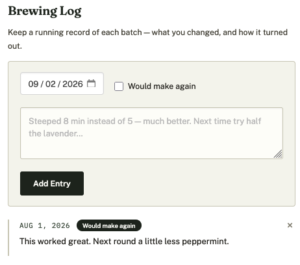
Where Notes hold a single running thought about a recipe, the Brewing Log tracks it over time. Each time you actually make something, log the date and a quick “would make again” flag. Testing three variations of the same tea before you land on a favorite? The Log is where that history lives — a running record of what you’ve actually brewed, not just what you meant to.
Together, these four tools turn Teapotheca from something you browse into something you build on — a Herbarium that fills in with use.
Joining the Full Herbarium
Teapotheca’s core library — a curated set of herbs and recipes — is free to browse, always. The Full Herbarium membership unlocks the complete library plus every member tool above: saving, notes, Collections, the Brewing Log, and the extra Discovery filters.
Safety information is never part of the paywall. Whatever your membership status, if a herb carries a caution, you’ll see it.
A Note on the Recipes and Research
Every entry here is individually researched rather than pulled from a template — species names checked, cautions verified, traditions cross-referenced against their real sources. Where we’re not certain, or where a plant is better known for one thing than another, we say so rather than smoothing it over. Consider Teapotheca a well-kept reference shelf: thorough, but never pretending to more certainty than the evidence supports.